


Quick Glance
It is tempting to use just prompts and quickly ship your site. But it will result in creating a lifeless zombie-like portfolio that screams AI.
Using prompts is pointless because you are solely focused from a visual lens.
It is better to design your website with a better thinking framework: your value system. This is the anchor that shapes the words that you write on your site and its corresponding design features that complement these words.
It took me about 2 to 3 days from ideation to finish. You can do it in a day if you follow my guide below.
Welcome back to Essay 6 of ‘The Long-Term Game’ Curatorial Reads Delivered Every Monday on Thought Leadership Thinking: Learn how accomplished founders and professionals write & think to build their niche expertise, and apply the same frameworks yourself.
As founders and professionals, we are on the lookout to get things done faster using AI tools.
It is tempting to use just prompts and quickly ship your site.
But it will result in creating a lifeless, zombie-like portfolio that screams AI.
That’s because using prompts is pointless — you are solely focused from a visual lens; How your website should appear. How to write your About section.
When you do that, you end up creating the same regurgitated AI design created by your next-door neighbour. Not a day goes by that I scroll through LinkedIn and it just takes me a second to see people creating posters or websites using AI. Most of them are vomit graphics.
Therefore, it is better to design your website with a better thinking framework: your value system. This is the anchor that shapes the words that you write on your site and its corresponding design features that complement these words.

I have been a drag-and-drop website tool user. I have played with Beehiiv, Wix, Squarespace, WordPress and Weebly for years. I have helped colleagues and friends to create their digital portfolios. You need to pay a subscription to access premium features of these tools.
And now, thanks to AI, that moat is broken, as you can design a hot-looking website by vibe coding. There is a new challenge though — vibe coding involves you thinking deeply and conveying that thinking into clear-cut instructions that AI can understand.
I decided to redesign my site using Claude Code after a nudge from my friend Alan Soon, co-founder of Splice Media, and Anirban Das, a newsletter consultant.
It took me about 2 to 3 days, from ideation to finish.
You can do it in a day if you follow my guide below.
1. Foundation of a great website: 10 questions to get started
Always start with the words that you want to convey on your website.
Your website should answer the following questions:
Who you are
What you do
What you love
The things that you have worked on and built
The type of people you love helping
The problem that you solve for these people
Why you are worthy and the right person to solve that problem
The above questions are pretty straightforward, but extracting deep reflective thinking of how you operate and function as a person demands that you go deeper into the cave of your mind.

The best way to frame such questions is downloading your LinkedIn profile as a PDF and then nudging it to ask a series of think-out-loud questions where you can ramble on, and then dump your response. AI tools work better if they know who you are, your work, and other core context.
You can use these questions for yourself:
Think of a client interaction, a project, or a piece of work — yours or someone else’s — that made you feel genuinely proud. Not successful. Proud. What was happening in that moment, and why did it feel different from everything else?
Describe the type of client or collaboration that would make you want to walk away — even if the money was good. What’s the thing you absolutely cannot work around?
What do you see happening in [your industry] that genuinely irritates you — something you find yourself ranting about, even privately? What’s wrong with how most people are doing this?
You have walked into a lot of rooms in [your work] — difficult conversations, high-stakes moments, unfamiliar situations. What habit or instinct from those experiences do you still carry into every client relationship today?
Forget your ideal client framework for a second. Picture one real human being — someone you’ve met, someone you admire from afar, someone you wish you could work with. Describe them. What’s their life like? What keeps them up at night? Why do you want to help specifically them?
There is an inherent tension in [your work] — where do you draw the line? What would make you say “I can’t put my name behind this” — regardless of the brief, the budget, or the opportunity?
Your background in [your field], your years of experience, your defining career moments — what did those teach you about people, problems, or truth that you think is genuinely missing from how most people in [your industry] operate today?
Think ten years from now. What do you want to be known for? Not your services. Not your products. You — as a thinker, a builder, a person.
If your career were a story, what genre would it be? And what chapter are you in right now?
If you could say one thing to every potential client before they hired you — something honest, even uncomfortable, that would set the right expectations — what would it be?
Pro tip: Use Wispr Flow to answer the above questions. Dictating your response is faster and makes your job easier.
2. Structure your website like a copywriter
I then started editing my responses to the questions above.
I never, ever ask AI to generate any words of its own. I have trained it to only edit my words or rearrange my words, which I call the ‘Jenga stacking method.’
I refer to examples of writers and journalists whose work I admire, and I notice they follow different copywriting frameworks, such as problem-agitation-solution (PAS).
I believe any landing page should do that, with the intent of either capturing an email address of potential partners or readers of your work.
Resource: If you have 45 minutes — I strongly recommend watch this video!
3. Why visual examples and references make your job easier
For design reference
As a ghostwriter, I follow several other online writers and authors.
I have spent long hours studying how they design their sites. The best ones are those that have life in them from words to photos to graphical elements.
That is exactly what I wanted to do for my own site.
I gave screenshots of websites of writers whose work I admired, particularly the design element, and then I told Claude to refer to this as a basis for my own website.
I told Claude about the font I love, the colour scheme I find attractive, and other design elements I prefer. This offered Claude a detailed design context of my taste.
Give specific screenshots to fix errors
As you converse in the chat with Claude Code to build your website, it will give you iteration after iteration after you dump detailed context.
You will certainly notice things which are errors, such as design mismatch, font change, and feel and look. I reckon that you take a screenshot of those mistakes, label it using the screenshot’s pen, and then tell your corrections.
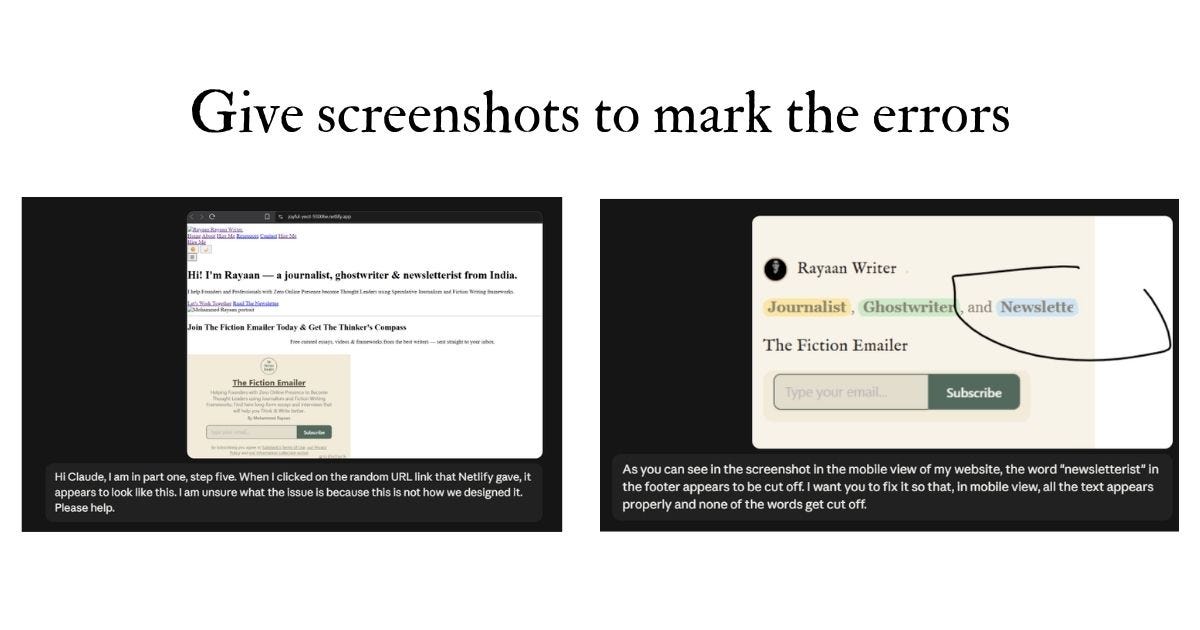
Instead of “make dark mode better,” I said: “make the background pure black and font white; force all highlight/circle-marked keywords to render as yellow-highlight-with-black-text specifically in dark mode.”
Naming the exact colour hex code makes it easy for Claude to understand.
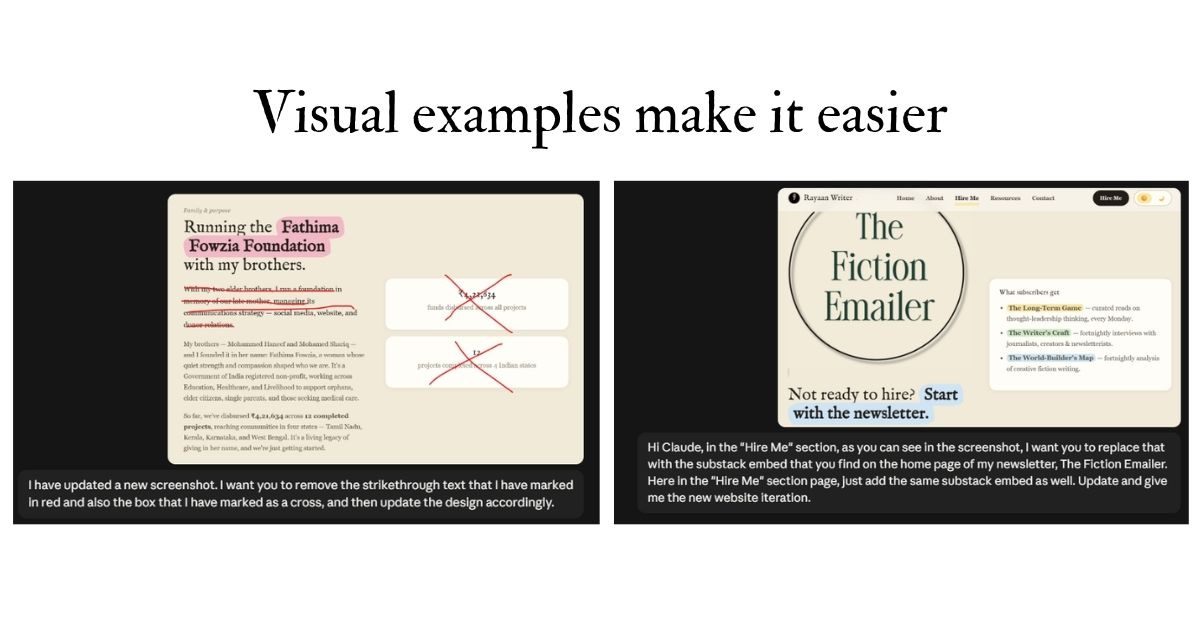
As you iterate with Claude, it may fix certain sections of your website, whereas some other sections might look odd.
Taking a screenshot of the proper fixed panel (which you do not have an issue with) and using that as a reference can help Claude to fix other sections of your site.
Explicitly state what should NOT change
Whenever I had to do a correction for a panel on my site, there were certain elements which I didn’t want to change.
Example: I was doing a correction on the contact page of my site, which had a Tally form. In the dark mode, the contact box also turned black.
Here is the instruction that I wrote for Claude to fix it — “I don’t want you to change anything. Just retain it as it is, with a white background and black text.”
Adding screenshots and circling the boxes or text using a marker that you don’t want to change, and then saying things like, “Don’t change the button in this panel as marked in the screenshot with red ink,” works like magic.
4. Ask AI to fix your tech issues
The next stage involved figuring out the tech aspect of posting it and then linking a domain that I already own through GoDaddy.
I asked Claude, “How do I do it?” and it gave me a great step-by-step process which even a fifth-grade kid could do. It nudged me to host my site on Netlify, as it is free.
Final thoughts
Building a site by vibe coding involves a lot of patience, but honestly, it is more about how good you are at giving instructions.
And that’s all for today!
Reach out to me on LinkedIn to say hi.
You can simply reply to this email or comment below. See you soon! 😊❤️